
Contents of this article:
- Teach First Kit Return Instructions
- What to do next?
- UN 3481 Lithium Ion Battery Shipping Label
- Contact
Teach First Kit Return Instructions
Once you have either completed or withdrawn from the Teach First programme and IRIS Connect gets notified either by you directly or via a weekly report from Teach First, you will receive an email communication from IRIS Connect to the email address you provided to Teach First.
The email will contain the following:
- a link to the "Royal Mail Return an item" page
- a unique order number associated with your record
- further instructions on how to return your kit, which is also outlined in the text below.
What to do next?
WARNING! Remove all passwords, passcodes or other device locks from the device
Any device/screen locking mechanism must be removed before returning the Teach First Kit. This includes a Pin, Password, Pattern or Biometrics. Failing that will prevent the device from being used for the next participant.
1. Get your parcel ready
Ensure that all required components are in the kit. See below for the list of contents that you need to return.
Contents
1. Samsung Tablet or Phone
2. Velcro strap
3. Microphone charging cable
4. Tablet plug and charging cable
5. Microphone and lanyard
6. Microphone case with spare tripod parts
7. Shoulder strap for case
8. Return Pack (containing battery label, label pouch and grey plastic bag). Use this to send the case back in
9. Tripod and device holder
10. Cardboard box (use this to send the case back in)
Put the Teach First Kit back into the cardboard box it arrived in. If you no longer have the original box, you can use either a different cardboard box or the grey plastic bag supplied in the Return Pack as an alternative. If these are not available, you can also use a couple of standard hard-plastic bags.
If you no longer have the original box, make sure to use the battery label from the Return Pack and attach it to the package.
2. Create your label
Follow THIS LINK to access the custom return page. You will see a message "Welcome to the 4PL Tracked Returns Portal" (this is our dedicated shipping provider).
You will not be charged for this shipping as the label is already prepaid by Teach First.
Complete the Required Fields*:
Order Number: This is a unique number emailed to you by IRIS Connect. The number starts with TFKR-****
You must enter the correct Order Number, as it will be used to track your shipment.
Original Delivery Postcode: Populate with your current postcode (it's OK if it's different from the postcode the kit was originally sent to)
Return Reason: Select "Other"
Next, please provide your contact details: Email address, Full name and Home address.
After that, tick the "My item does not exceed the maximum weight and size limit" box and click the Create your label button.
3. Send your kit back
Teach First has already prepaid the return service; therefore, you will not be charged. No printer is required.
When returning your Teach First Kit to IRIS Connect, you can choose from the following two options:
Collect From Me
Please follow the guide below and schedule the collection from a UK address of your choice.
Click on the Book a collection button or follow the "I would like a collection" unique link that was emailed to you by Royal Mail.
You will be taken to the Item details page. It will indicate that the collection is FREE.
Here you must select the following:
Size of the item: Medium Parcel (up to 20Kg)
Weight of the item: Up to 5Kg
Then click the Continue button.
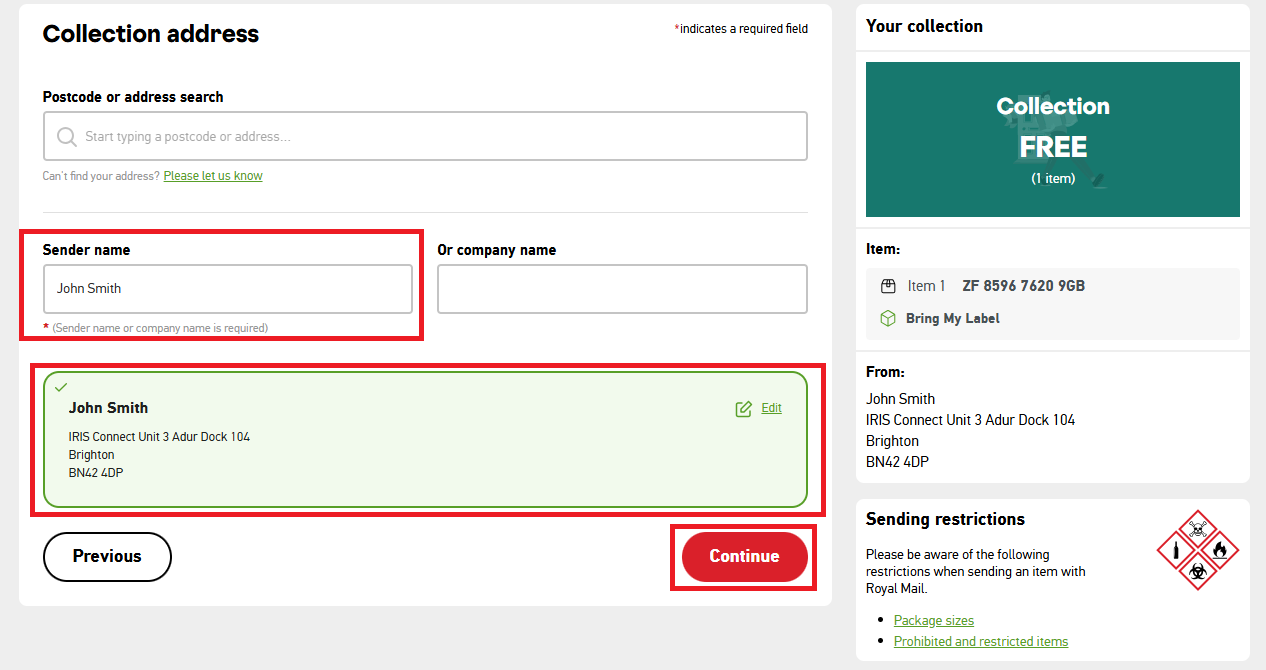 Collection Address
Your contact address will be automatically pre-populated as the Collection address.
If you want the collection to be from a different address (for example, your school), please update it in this step.
After that, populate the Sender Name and then click Continue.
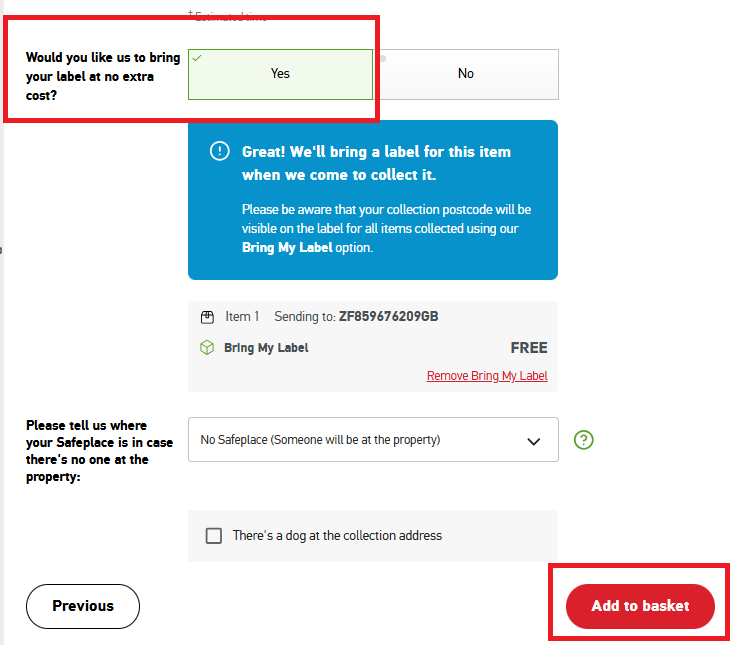 Collection Date
Please select your preferred date (you can also select Saturday collection and no extra cost)
Would you like us to bring your label at no extra cost: YES
Then select Add to basket
Your basket
Review all the collection information, including the Collection address, Collection date, Collection cost (FREE) and Collection type (Bring my label).
Checkout
Confirm your email address, make sure Terms & Conditions are ticked and then click Complete purchase free of charge.
Drop Off Your Item
If you do not want the Teach First Kit to be collected from the address of your choice, you can drop off the Teach First Kit at a Parcel Postbox, Postbox, Locker, ParcelShop (Collect + or Post Office) or Delivery Office. After creating the shipment, Royal Mail will send you an email with the QR code so no printer is required. Using the QR code in your email, you can take this to one of Royal Mail printer-enabled Lockers, Parcelshop (Collect + or Post Office) or your local Delivery Office.
Drop Off Services near you
UN 3481 Lithium Ion Battery Shipping Label
There should be a battery sticker included in your return pack in your kit but if you don't have one you can print the one below and attach it to your package.
Contact
If you require any other assistance, please contact IRIS Connect on 0333 136 2483 or support@irisconnect.co.uk.